CLTV vs CAC Analysis Excel Template

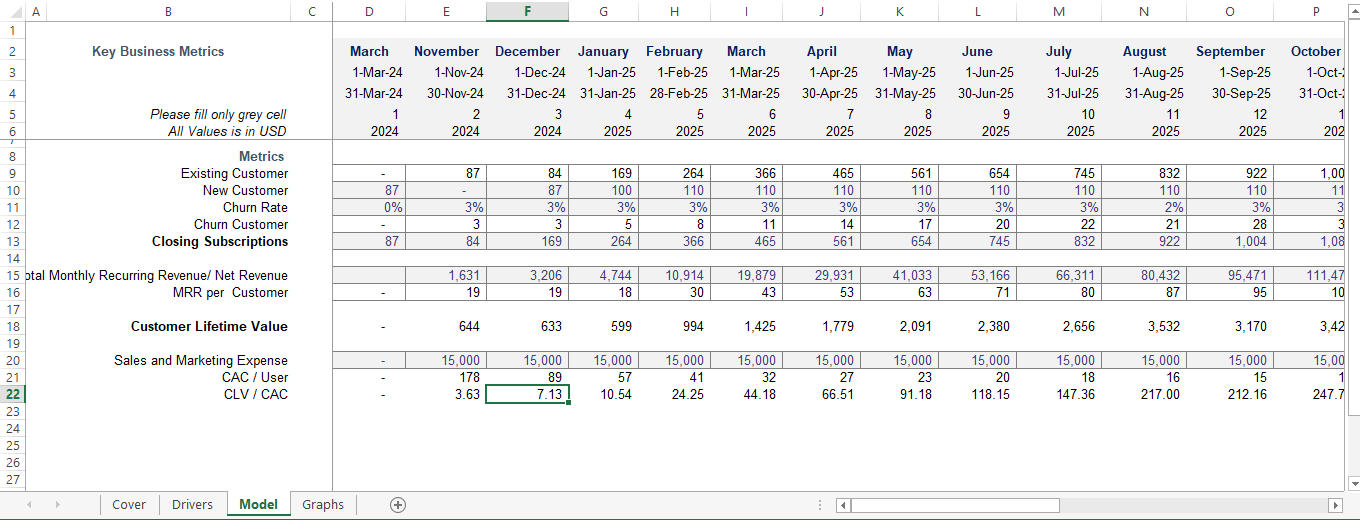
A simple, ready-to-use Customer Lifetime Value Excel Template for Startups, built as a monthly CLV CAC Analysis Spreadsheet for SaaS and subscription businesses. This pre-built LTV to CAC Ratio Template turns your customer, churn, and marketing spend data into a clear, investor-ready CLV/CAC ratio automatically.

  • Monthly Rolling Timeline, Track Trends, Not Just a Snapshot
  • Built-In Churn & Subscriber Tracking (New, Existing, Closing)
  • Automatic Customer Lifetime Value (CLTV) Calculation
  • Automatic Customer Acquisition Cost (CAC) per User
  • Instant LTV : CAC Ratio Output
  • Visual Graphs Tab for Board & Investor Reporting
  • Ideal SaaS Metrics Excel Template for Recurring-Revenue Businesses
  • Fully Editable, Not Password-Protected
(6 customer reviews)

$0.0

✅ Trusted by 2,000+ Founders & Investors Worldwide

Why Choose Our CLTV vs CAC Analysis Excel Template

Startups have used our financial model templates to raise up to $5 million in Series A capital and seed funding. These models were developed by FMVA-certified professionals. We have worked with over 50 businesses and created more than 500 financial forecasting and valuation models for startups.

CLTV vs CAC Analysis Template: Essential for Startup Financial Planning

Description

Master Your Unit Economics Before Pitching to Investors

Download a Simple, Ready-to-Use LTV to CAC Ratio Calculator

If you cannot explain your LTV to CAC Ratio to an investor, your fundraising success is left to chance. Investors, board members, and growth marketers all expect subscription-based businesses to demonstrate that every dollar spent on the acquisition of a customer pays several times over during their lifetime.

With this CLTV vs CAC Analysis Excel Template, you can eliminate any manual errors in Excel and have an automated monthly view of your business’s profitability and unit economics.

Key Features & What’s Inside the Model:

Subscriber and Churn Economics:

  • Enter your monthly New Customers and calculate Existing vs Closing Subscriptions.
  • Apply a % of monthly churn to understand subscriber attrition and measure retention across a 24-month period

Revenue and CLTV:

  • Calculate your Monthly Recurring Revenue (ARR) and track it on a monthly basis.
  • Determine the average MRR per User (also known as ARPU).
  • Calculate Customer Lifetime Value (CLTV) based on the subscriber churn and revenue trends.

CAC & Acquisition Efficiency:

  • Track your Sales & Marketing expenses, including ad spend, sales compensation, and overhead.
  • Calculate the CAC (Customer Acquisition Cost) per user.
  • Determine your LTV : CAC Ratio at a glance to see if you hit the 3:1 benchmark or higher.

Visual Dashboard and Presentation Graphs:

  • The Excel Dashboard Builder is invaluable when presenting to investors, the board, or in internal meetings.
  • It pulls in the numbers from the spreadsheet above and displays it as an easy-to-read visual graph.

How the Excel Model Works (It’s Simple)

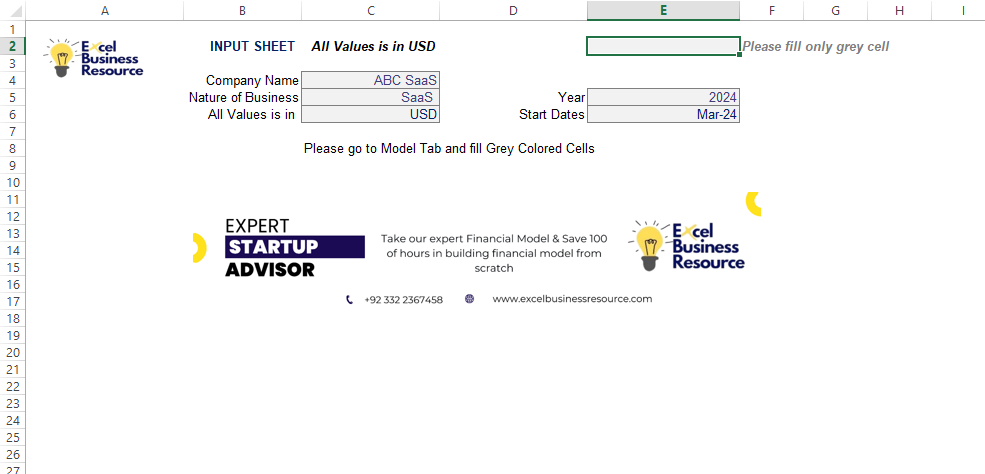
1. Set the Assumptions (Also Called Drivers)

Set your company name, starting month, and currency (USD, EUR, etc.)

2. Enter Your Monthly Metrics (In the Grey Cells)

Enter your monthly marketing expenses, new customers, total MRR, and estimated churn rate

3. View Your Calculations (See the Results and Graph Below)

Your closing subscriptions, average MRR per user, CLTV, CAC, and LTV:CAC Ratio will be calculated and display in the graphs below

What is a good LTV to CAC ratio for startups?

Generally, a 3:1 LTV to CAC ratio is considered the industry standard benchmark for healthy SaaS and subscription startups. A ratio lower than 3:1 indicates inefficient marketing, while a ratio above 5:1 may mean you are underinvesting in marketing growth.

6 reviews for CLTV vs CAC Analysis Excel Template

  1. Richard –

    This template made it incredibly simple to analyze our CLTV and CAC, giving us instant clarity on our business’s profitability.

    1 product
  2. Hannah (verified owner) –

    Simple, intuitive, and very professional. Perfect for tracking budgets and expenses efficiently.

    1 product
  3. George (verified owner) –

    Works perfectly for both personal and small business finance management.

    1 product
  4. Zoe (verified owner) –

    Saved me so much time preparing reports. Very professional and ready to use.

    1 product
  5. Olivia (verified owner) –

    Clear, concise, and highly professional templates. Worth every penny.

    1 product
  6. Ella (verified owner) –

    Perfect for freelancers and entrepreneurs. Simplifies financial record-keeping.

    1 product

Only logged in customers who have purchased this product may leave a review.

Get started with our​ CLTV vs CAC Analysis Excel Template

What Our Clients Say

Everything You Need to Know Before Buying Our Financial Models

Everything founders and finance teams ask about our dynamic Excel projections

Are these financial models user-friendly for non-finance founders?

Yes, absolutely. All our financial models are designed with a clean, intuitive, and color-coded layout (e.g., blue text for inputs, black for formulas). You don’t need an accounting degree or advanced Excel skills. You simply enter your business assumptions in the designated input cells, and all dynamic calculations, financial statements, and dashboards update automatically.

We maintain a strict quality assurance process for every template. However, if you discover any error, broken formula, or discrepancy, we provide free error fixes and corrections instantly. Just reach out to our support team with a screenshot or detail, and we will rectify and send you an updated file free of charge.

Yes! While each template is fully dynamic and built around industry best practices, we understand every startup or business has unique operational drivers. We offer bespoke financial modeling and customization services tailored to your exact requirements. (Note: Customization work, adding specialized revenue drivers, or bespoke functional changes carry additional fees based on the scope).

100% Yes. Every model in our library is engineered specifically for its target industry, incorporating true unit economics, relevant driver assumptions (e.g., CAC, churn, occupancy, utilization, or yield), and standard financial structures. Changing key inputs instantly updates your revenue projections, P&L, Cash Flow, Balance Sheet, and Valuation metrics.

Yes, completely. All templates are built in standard Microsoft Excel (.xlsx) format and are fully compatible with Excel for Windows, Excel for Mac, Google Sheets, and Microsoft 365. You can seamlessly upload the file to Google Drive and collaborate live with your co-founders, CFO, or advisors.

Yes. Banks and lenders require standard financial projections, specifically a 3-to-5-year Income Statement, Cash Flow Statement, Balance Sheet, and Debt Amortization/Repayment schedule. Our models include all these standard reports pre-formatted for printing or exporting as professional PDFs for loan applications.

Every model includes a built-in Instructions / Getting Started Guide sheet that walks you through each section step-by-step. If you ever get stuck or need quick guidance on where to enter specific metrics, our support team is available via email to help you navigate your template.

Customized Spreadsheets

Tailored to met your unique financial needs.

Comprehensive Training

Empowering you to use models effectively.

Accurate Projections

Make informed decisions with confidence.

We prepare comprehensive business plan to launch and grow startup with;

Data-Driven Market Research

Detailed market analysis and SWOT insights

Business Model Canvas

Clear visualization of your business structure

Financial Projections

Valuation and forecasts to showcase your potential